Computer Hard Drive
 A computer hard drive is the place where computer data is stored. A HDD (Hard Disk Drive) is generally referred to as the secondary computer storage device, as the RAM (Random Access Memory) is the primary. Data that is stored on the RAM is volatile meaning when the computer is shut down then the information will be lost.
What is a Hard Drive?
When you turn on your computer it starts the Boot Process which tells the computer to go to the hard drive for the Operating System.
A hard drive is a permanent storage device, so even when the computer is turned off the information will still be there. The operating system, program files, and all data files are stored on the hard drive. A computer can function without a hard drive but there would be no operating system or programs so it would be of very little use.
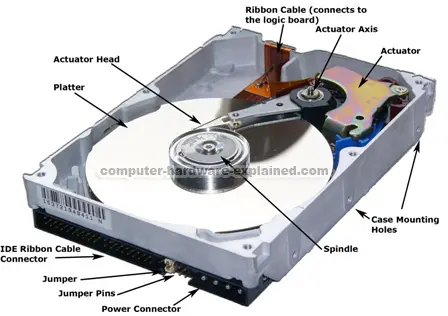
A hard drive uses circular platters to store data. These are kept in pristine condition and are very good mirrors. If you open a hard drive case, the air will contaminate the platters and it is unlikely that it would work again. The actuator arm runs between the platters reading the information in 1’s and 0’s. The head of this arm reads data even when the disk is running at 7200rpms (a common hard drive speed).
This means that the platter is doing 7200 rounds per minute. More recent computer hard drives can now do up to 15,000rpms. As the platters go round and round the head reads it and processes the information which then proceeds to the connector which connects to the computer.
External or Internal?
All the hard drives that are inside a computer are called internal hard drives. All the pictures on this page show internal hard drives. External hard drives sit outside the computer in a case and they connect to the computer through USB, Firewire or eSata.
External drives are very useful for backing up your computer and for transfering files to two locations. External drives are also very portable and there are even smaller portable drives that use a computer hard drive that is very similar to a laptop hard drive.
Hard Drive Connectors
There are currently three connector cables in a common hard drive. These are the: IDE Ribbon Cable, SCSI Cable and the more recent SATA Cable.
Hard Drive Magnets
Located in the actuator are very strong magnets. When I have old hard drives that I no longer need, I open them up and take out the magnets. I give them to my brothers who enjoy playing with them. This page will explain how to take computer magnets out.
Hard Drive Capacity
A computer hard drive is measured in Gigabytes. For example, a computer may have a 80Gb (Gigabyte) hard drive. Different files take more space. Video files and pictures take up a lot of room, but simple text files take next to nothing. The operating system and program files take up space as well.
Hard drive capacities vary between 1Gb (or less) to 2Tb (maybe even bigger).
Hard Drive Manufacturers
There are a number of hard drive manufacturers that build hard drives and then distribute them to different shops and online stores to sell them. I plan on reviewing all of them, but in my opinion, Wesern Digital and Seagate are the best.
- Western Digital
- Seagate
- Samsung
- Iomega
- Hitachi
Go to this page on how to format a hard drive using Windows Vista and watch a very handy video.
Want to buy a hard drive? Well choose a hard drive first and then go to an online store and find the Best Hard Drives available online!
Do you have a question, comment or review on hard drives? Go to my new forum and post it there.
Related Articles
- External Hard Drives
- Portable Hard Drives
- Hard Drive Manufacturers
- How to choose a hard drive
- How to install a hard drive
- How to erase a hard drive
- How to format a hard drive using Windows Vista
- How to format a hard drive using Wndows XP
- IDE Ribbon Cable
- SATA Cable
- Gigabytes
- Boot Process
- Hard Drive Forum
- Backing up files
- Hard Drive Maintenance
Leave Computer Hard Drives and return to the Homepage